BackThen - Baby Book & Albums
- 4.8
- Rating
- 100.00K
- Installs
- Free
- Price

 Analysis by App-foxy
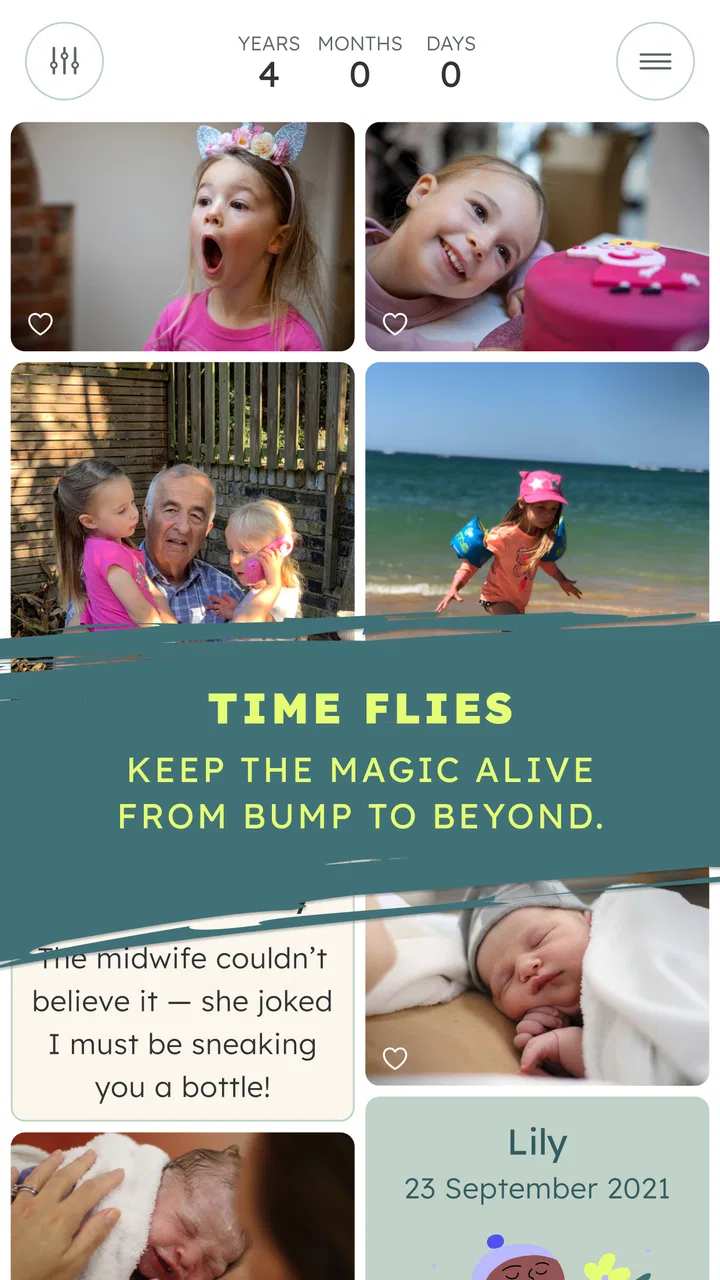
Keeping family memories organized sounds simple until photos are scattered across phones, group chats, cloud folders, and social networks. BackThen - Baby Book & Albums takes a more focused approach: it is a parenting app built around a private family space for photographs, milestones, and those small “firsts” that are easy to forget in the rush of daily life. I found its appeal less in replacing every photo tool I already use and more in giving meaningful family moments a home with a clear purpose.
That focus matters for a first-time parent, a grandparent who lives elsewhere, or relatives who want to follow a child’s growth without joining a public social network. Back Then Digital Ltd has made the app free to start, with optional in-app purchases priced at $6.49 per item. It is suitable for Everyone, runs on Android from version 7.0 onward, and the current version is 2.9.2.0. The app has built a strong audience, with a 4.8 average from around 9,200 ratings and more than 100,000 installs.
What to expect from this private family album
The most useful way to think about BackThen is as a digital baby book with a sharing layer, not as another general-purpose gallery. A normal phone gallery is excellent for storing everything, but it does not naturally explain why a picture matters. A messaging group is convenient for sending a new photo, yet older images quickly disappear beneath conversations. Social media can make sharing easy, but many families are understandably uncomfortable placing childhood memories in a public or semi-public setting.
You May Also Like

 Blood Strike: 2.5 Anniversary
Blood Strike’s Loadouts Turn Every Drop Into a Tactical Gamble
A close look at Blood Strike’s custom loadouts: how fast access to signature weapons reshapes its battle royale rhythm, rewards preparation, and narrows the gap between fights.

 Pandora - Music & Podcasts
Pandora’s Music Is Easy to Start, but Harder to Recover
Pandora’s strength is its low-effort path from a seed to a station. Its weak spot is how much confidence it asks you to place in connection, setup, and quiet recovery.

 8 Ball Pool
 Is Built on Rivalries, Rematches, and Routine
A close look at the rivalries, rematches, shared routines, and unanswered safety questions that turn a quick pool match into a persistent mobile community.

 Samsung Music
’s Quiet Strength Is Playing What You Already Own
Its reach comes less from spectacle than from dependable access to a personal library. That simplicity is both the app’s strongest retention engine and its ceiling.

 AccuWeather: Weather Radar
AccuWeather Review: A Quick, Clear Forecast for Everyday Decisions
For everyday plans, the best forecast is the one you can understand quickly. AccuWeather makes rain timing, radar, and local conditions easy to act on, with a few trade-offs.

 Hill Climb Racing
Why Hill Climb Racing Still Turns Crashes Into One More Run
A tiny car, a bumpy hill and one more upgrade: Hill Climb Racing keeps resurfacing because its simple chaos makes every near-miss feel personal.
More From Our News Desk



This app sits between those choices. I would use it when the goal is to collect a child’s story over time and let selected family members see it in one place. That distinction makes the experience calmer than a stream of unrelated images. A first smile, a visit, a new skill, or an ordinary afternoon can be treated as part of a continuing record rather than just another file in a camera roll.
The private emphasis is especially valuable for families with different levels of technical confidence. Not everyone wants to learn a complicated photo-management system, and not every relative wants to keep up with a social feed. A dedicated family album gives the group a shared destination. The trade-off is that it is another app to introduce and maintain. If your relatives already use one familiar service enthusiastically, asking them to move may create more friction than benefit.
I also would not treat it as a full replacement for a device backup. A baby book is about meaning and access, while a backup is about protecting original files. I still prefer keeping important photographs in my normal storage routine as well. BackThen makes the family record easier to follow, but it should be part of a sensible photo habit rather than the only place where irreplaceable pictures exist.
Who will get the most from it
The strongest match is a family that wants controlled sharing without turning every update into a public post. It is also a good fit for parents who want to look back by occasion or milestone instead of scrolling through thousands of unrelated images. Grandparents and other close relatives may appreciate the dedicated context because they can follow the child’s story rather than receiving occasional files with no explanation.
I would be more hesitant to recommend it to someone who only wants quick photo editing, automatic device backup, or a broad collaborative workspace for documents and videos. Those jobs call for different tools. BackThen’s value comes from its parenting focus, and that focus is precisely why it may feel too narrow for a household looking for one app to manage every type of media.
Getting started without overbuilding the album
My advice for the first setup is to begin with a small, meaningful collection rather than importing everything immediately. Choose a handful of photographs that already tell a clear story: perhaps the arrival home, an early family visit, and one everyday moment. A modest starting point makes the album feel intentional and gives you a quick sense of how the app fits your routine.
When you invite relatives, start with the people who will genuinely use the space. A private family album works best when the audience is clear. Adding everyone at once can make the first experience feel like administration, especially if some relatives rarely open shared apps. I would rather begin with one or two engaged family members and expand the circle once the album has a rhythm.
Before adding a large batch of images, decide what you want the album to remember. Some parents will prefer a chronological record, while others may think in themes such as first outings, family visits, or changing interests. The important point is consistency. If every upload is made with a slightly different idea of what belongs, the collection can become difficult to browse later.
A useful first-session habit is to prepare a short note for each important image instead of relying on memory months later. The note does not need to be elaborate. A simple explanation of where the picture was taken, who was present, or why the moment mattered can turn a pleasant photo into a much stronger family keepsake. This is one of the app’s less obvious advantages: the act of organizing encourages you to preserve the story around the image, not just the image itself.
Your first meaningful success
The first successful action should be creating one small, complete memory sequence. Pick a few related photographs, arrange them as a single moment or milestone, and share that finished piece with the intended family audience. This is more rewarding than uploading a random photo because it demonstrates the app’s central purpose in one step: collect, add context, and let family members experience the moment together.
For example, imagine a parent returning from a short outing with a baby. Instead of sending several pictures separately through a chat, I would select the clearest images, add a brief description of what made the outing memorable, and place them together. A grandparent opening the album later gets a coherent little story rather than a sequence of files mixed with unrelated messages. That difference may sound small, but it is exactly where a dedicated baby book earns its place.
Do not wait for a major milestone to begin. The first meaningful entry can be an ordinary evening, a favorite expression, or a visit from someone important. In my experience, regular small records are more valuable than a system that is used only for birthdays and dramatic events. The app becomes easier to maintain when adding a memory feels like a natural part of looking after the family story.
There is also a practical reason to start with a small sequence: it exposes your preferred level of detail. Some families enjoy writing a sentence for every photograph, while others want a clean visual record with only occasional notes. Testing that balance early prevents the album from becoming a chore. If adding content takes too long, simplify the process rather than abandoning it altogether.
How to make the timeline useful later
A chronological album can become surprisingly valuable when a child grows quickly and memories begin to blur together. I recommend adding entries soon after events while names, places, and small details are still fresh. Waiting for a quiet weekend often means the photos remain on the phone and the story is forgotten.
Another useful workflow is to make a short monthly review part of your routine. Look through recent photographs, keep the moments that genuinely say something about family life, and leave out near-duplicates. This creates a more readable record than uploading every image. It also reduces the chance that relatives stop checking the album because they are overwhelmed by repetition.
For major occasions, I would separate the preparation from the sharing. Select and arrange the pictures when you have a few calm minutes, then publish the finished memory when it feels complete. That approach is less stressful than trying to sort images while guests are still present. It also produces a better record because you can choose photographs for the story they tell rather than for how quickly they can be sent.
The best result comes from treating each upload as a future memory, not as a live status update. That mindset is what separates this app from a family chat. A chat rewards speed; a baby book rewards clarity and reflection.
Common points of confusion and everyday trade-offs
The word “private” can lead new users to expect the same convenience as a public social network, only with a smaller audience. In practice, privacy and simplicity involve choices. You need to be deliberate about who belongs in the family circle and what you want to record. That extra thought is a benefit for families who care about boundaries, but it can feel slower than forwarding a photo to a familiar chat.
Another possible confusion is assuming that every relative will interact with the album in the same way. Some people may enjoy looking through a growing collection, while others may only open it when they receive a particularly meaningful update. I would not measure the app’s success by constant activity. The goal is to create a dependable place for memories, not to manufacture a daily conversation.
The free entry point makes experimenting easy, but the optional purchases deserve attention before a family builds its long-term routine. At $6.49 per item, a purchase may be reasonable if it unlocks something you specifically value, but I would first use the free experience long enough to understand whether relatives actually return to the album. Paying for a feature before establishing that habit is an avoidable mistake.
There is also a curation trade-off. A carefully maintained album feels personal and easy to revisit, while a neglected one can become another digital storage box. BackThen cannot decide which moments matter to your family. If you upload without any pattern, the parenting focus will not automatically make the collection meaningful. The app supports the process; the quality of the record still depends on the choices you make.
Parents should also consider how they want to handle photographs that include other children, relatives, or sensitive family situations. A private family setting may feel comfortable, but it is still wise to think before uploading. I would use the same care here as with any shared photo service: select the audience thoughtfully and avoid treating convenience as a substitute for judgment.
Where it compares well with familiar alternatives
Compared with a standard photo gallery, BackThen offers a stronger sense of purpose. The gallery is better for searching across every image on a device, but it rarely gives relatives a clear family narrative. Compared with a messaging group, BackThen is easier to revisit because memories are not buried under replies, stickers, and unrelated announcements. The chat remains better for quick discussion, while the album is better for lasting organization.
Compared with a broad social network, the parenting focus feels more appropriate for families who want a smaller audience. You are not asking a general platform to behave like a baby book. That said, a social network may be more convenient if every intended viewer already uses it and does not want another account or app. Convenience can outweigh specialization when the family’s main priority is immediate reach.
Compared with a printed baby book, the app is easier to update and share with relatives who live far away. A physical book still has a tactile quality that a screen cannot reproduce, and some families will prefer the permanence of paper for their favorite memories. I see BackThen and a printed album as complementary rather than competing choices: use the app for the living record, then create a smaller physical selection when you know which moments deserve a place on the shelf.
Questions worth answering before you commit
If you are wondering whether the app is suitable for a whole family, I would ask one practical question: will the people you care about actually use a dedicated album? If the answer is yes, its focused design can reduce the clutter found in ordinary chats. If the answer is no, the most elegant organization will not solve the adoption problem, and a familiar existing service may be the better choice.
If you are concerned about starting with a large backlog, do not make that your first task. Begin with recent memories and add older photographs only when you have a reason to revisit them. This keeps setup reassuring and gives the album a clear starting point instead of turning installation into a weekend project.
If you are unsure whether to add every photograph, I recommend choosing for emotional and historical value rather than technical perfection. A slightly imperfect picture of an important moment can belong more than a polished duplicate. The point is to help family members remember, not to build a professional portfolio.
If you are deciding whether optional purchases are worthwhile, wait until the free experience has become part of your family’s routine. Notice which parts of the process you use repeatedly and which people engage with the collection. That evidence is more useful than buying immediately based on the promise of a larger feature set.
Finally, if you want a complete photo-management system, be realistic about the app’s role. I would keep a separate backup and continue using a normal gallery for broad storage and searching. BackThen works best as the meaningful family layer placed above that general archive.
My recommendation after building a family memory habit
BackThen is a thoughtful choice for parents who want more than a folder of pictures but less exposure than a public social platform. Its strongest quality is its clear purpose: it encourages families to preserve milestones and everyday moments in a shared, private-feeling space. The experience is most rewarding when you add context, keep the collection selective, and invite relatives who will genuinely appreciate it.
I like that the app can turn a scattered stream of baby photos into a record with emotional shape. I also appreciate that it does not require the first entry to be grand. A small, well-described moment can be enough to show why a dedicated album is useful. The process feels reassuring for a first-time user because success does not depend on importing an entire camera roll or mastering a complicated system.
Still, it is not the right answer for everyone. Families that already have an active, trusted sharing routine may find another app easier because everyone is already there. People seeking editing tools, comprehensive backup, or a universal media library should look elsewhere. And anyone who dislikes ongoing curation may eventually feel that a dedicated baby book asks for more attention than a simple folder.
For my own recommendation, I would install it with a modest goal: create one meaningful family entry, invite the closest relatives, and see whether the album makes future sharing feel more natural. If it does, continue with a light weekly or monthly rhythm rather than trying to document everything. With that approach, the free Parenting app from Back Then Digital Ltd becomes a practical home for the memories that deserve more than a quick message and more context than a camera roll can provide.
FAQs for BackThen - Baby Book & Albums
01What is BackThen - Baby Book & Albums used for?
BackThen - Baby Book & Albums is a digital memory book for recording and organizing a child’s early years. After reviewing the app, its main purpose is to let parents save photos, videos, milestones, stories, and important dates in a private timeline or album. It is designed to make everyday memories easier to preserve, revisit, and share with selected family members.
02Can I share my child’s photos and updates privately with family?
Yes, the app is built around controlled family sharing rather than public social posting. Parents can invite selected relatives or friends to view updates and memories, which can be useful for grandparents who live far away. Before sharing, review the available privacy and invitation settings carefully, because the visibility of each album or update depends on how access permissions are configured.
03Does BackThen require an internet connection?
An internet connection is generally needed for features such as creating an account, synchronizing memories, uploading photos or videos, and sharing content with other people. Some previously loaded information may remain accessible temporarily, but the app should not be treated as a fully offline scrapbook. If you are traveling or have limited data, uploading over Wi-Fi is the safer and more practical option.
04Is BackThen free to download, and are there paid features?
BackThen can be downloaded and used to begin documenting memories, but availability of features may depend on the current plan, region, and app-store offering. Some storage, printing, export, or premium options may require payment or a subscription. Check the latest Google Play or App Store listing before downloading, especially if you want to store a large number of videos or create physical albums.
05Is BackThen safe for storing personal baby photos and information?
The app is intended for private family memories, but users should still treat baby photos and personal details carefully. Use a strong, unique password, enable any available account-security options, and invite only people you trust. It is also wise to read the current privacy policy and backup terms, since cloud storage, account access, deletion requests, and data handling can change with future updates.
Pros
- Private sharing lets you control who can view your child’s memories.
- Automatic photo organization makes large collections easier to browse.
- Supports videos as well as photos for more complete memory albums.
- Timeline format creates a simple
- chronological record of milestones.
- Useful reminders can encourage regular updates and memory keeping.
Cons
- Some storage and premium features require a paid subscription.
- Uploading many videos may use considerable mobile data and storage.
- Family members may need an account or invitation to access shared albums.
- Editing options are less advanced than those in dedicated photo apps.
- Reliance on cloud storage means access depends on the service and internet connection.

BackThen - Baby Book & Albums
Gallery